
Latest News

  • Super Tower Defense Game
    Mar 10, 2010

    New to the games section is the new Super Tower Defense game. Defend your base from the ever advancing army of tanks, buggies...

  • New Rich Text Editor User Control
    Feb 19, 2010

    By popular request, here we present a re-usable User Control containing the Liquid RichTextBox along with the most common formatting functions included.

  • Silverlight 3 Controls V5.2.7 Released
    Feb 19, 2010

    This release includes several fixes for issues raised in the forum. The main improvement is to the RichTextBox which now provides access and methods to the document elements allowing...

  • Super Shoot Em Up Game
    Feb 04, 2010

    Added to the games section is the new Super Shoot 'Em Up game. Take control of a tank with your aim being to blow up your opposing tanks and collect all the powerups.

  • Silverlight 3 Controls V5.2.6 Released
    Feb 04, 2010

    This release includes some minor fixes for several forum posts. Please see the notes on the download page for full details on what has changed.

Silverlight TextBlock Plus

This enhanced TextBlock control allows you to apply effects to your text such as strike-through, shadows and borders.

To use the TextBlock Plus control you will need to add a reference to Liquid.RichText.dll in your project.


How to Use the TextBlock Plus Control

In your XAML ensure you have a reference to the Liquid.RichText.dll in the UserControl tag at the top, to use the TextBlockPlus on your Silverlight page:

<UserControl x:Class="TextBlock.Page"
    xmlns="http://schemas.microsoft.com/winfx/2006/xaml/presentation"
    xmlns:x="http://schemas.microsoft.com/winfx/2006/xaml"
    xmlns:liquidRichText="clr-namespace:Liquid;assembly=Liquid.RichText"
    Width="400" Height="300">
    <Canvas>
        <liquidRichText:TextBlockPlus Canvas.Left="5" Canvas.Top="10" Text="Some Slightly Shadowed Text" FontSize="25" Shadow="Slight" />
        <liquidRichText:TextBlockPlus Canvas.Left="5" Canvas.Top="50" Text="Some Shadowed Text" FontSize="25" Shadow="Normal" />
        <liquidRichText:TextBlockPlus Canvas.Left="5" Canvas.Top="90" Text="With a Dashed Border" FontSize="25" BorderType="Dashed"/>
    </Canvas>
</UserControl>


This simple demo does not require any C# to function, however you can reference the TextBlockPlus elements in the same way as any other Silverlight 2 control.

using System;
using System.Collections.Generic;
using System.Linq;
using System.Net;
using System.Windows;
using System.Windows.Controls;
using System.Windows.Documents;
using System.Windows.Input;
using System.Windows.Media;
using System.Windows.Media.Animation;
using System.Windows.Shapes;

namespace TextBlock
{
    public partial class Page : UserControl
    {
        public Page()
        {
            InitializeComponent();
        }
    }
}


Example Silverlight TextBlock Plus Control:
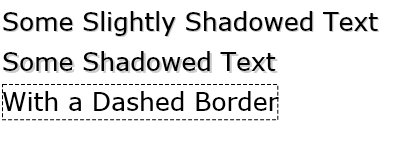
Silverlight TextBlock Plus Control

Latest Forum Posts

Here are latest posts from around the forums, if you have a question about any of the Liquid controls you can get your answers in the Forum.

PanzertaxNoruga posted on chat control

How can I add UIElements and make sure that the elements are created under each other?

Each time a button is clicked I add the following text

            TextBlock tb = new TextBlock();

            tb.Text = "The time is: ";

            tb.Foreground = new SolidColorBrush(Colors.Red);


            TextBlock tb1 = new TextBlock();

            tb1.Text = DateTime.Now.ToString()";

            tb1.Foreground = new SolidColorBrush(Colors.Black);


            rtb.InsertElement(rtb.Children.Count, tb);

            rtb.InsertElement(rtb.Children.Count, tb1);


            rtb.End();

            rtb.Bottom();


Now I want it to look like this


The time is 11:22:33

The time is 11:22:33

The time is 11:22:33

The time is 11:22:33


and not The time is 11:22:33 The time is 11:22:33 The time is 11:22:33 The time is 11:22:33


So i need a linebreak.. Also Im using vertical scroll so how can I make the richcontrol make the text at the bottom present?

I tried to set

     Scroll.ScrollToVerticalOffset(Double.MaxValue);

     Scroll.UpdateLayout();


In the button click event but since the text is inserted in this method I guess I have to set it in a event that is triggered. But I have not found this event. Like contentchanged is not affected by the  rtb.InsertElement(rtb.Children.Count, tb);


could anyone plz help me with this?

Is it possible to insert a icon as xaml (canvas)  instead of a png? I have xaml icons that looks much better when scaling?

november9 posted on RichTextBox.SelectionStyle.Family

Actually, I think I've spotted it now.  It seems to be that 'Portable User Interface' is anything selected that hasn't been created as a particular font.  If I can somehow put the RichTextBox into a default font, it might fix this.

dan posted on disable user input

Hi,


You can use the following to ensure content is read-only:


richTextBox.SelectMode = SelectMode.ReadOnly;


Thanks!

Hi,


The spell checker uses standard .dic files, you can find some here:


http://www.codeproject.com/KB/string/netspell.aspx


Thanks!

dan posted on Borders on div, p, etc

Hi Paul,


As you have found only a small amount of CSS is supported in the RichTextBox, there is a short list of what CSS is supported at:


http://www.vectorlight.net/controls/rich_textbox/importing_exporting_html.aspx


Thanks!

Silverlight Controls

  • Rich TextBox

    Create and edit rich content with this slick and expandable Rich TextBox...

  • TreeView

    This easy to use TreeView comes with drag and drop, sorting, searching and much more...

  • Context Menu

    You too can have cool popup context menus in your Silverlight applications...

  • Resizable Dialog

    Draggable and resizable popup dialogs are what serious Silverlight developers need...

  • Spell Checker

    Real-time spell checking in Silverlight? We did it first here...