
Latest News

  • Silverlight Online Chat
    Jul 24, 2010

    Today we launch the new Silverlight Live Chat application demonstrating the Liquid RichTextBox and Emoticon replacements.

  • New Super Shoot Em Up 2 Game
    Jun 29, 2010

    Added to the Games section is the new Super Shoot 'Em Up 2 game. Take control of your tank with the aim to defeat the computer controlled opponents. Features all new weapons, levels and Battle Mode!

  • Silverlight 4 Controls V5.3.2 Released
    Jun 28, 2010

    This release contains several fixes raised in the forums.

  • New Sandmania Puzzle Game
    Jun 18, 2010

    Sandmania is the latest game from vectorlight, the aim of this game is to guide sand from the top of the screen to the various colored containers below.

  • New Moon Tower Defense Game
    May 29, 2010

    Added to the Games section is the new Moon Tower Defense game. Defend the Moon from the circling Aliens and Humans.

Silverlight Resizable Table

This free Table control is similar to the standard Grid control, except with this all rows and columns can be resized easily and borders can easily be applied to cells.

This Silverlight only Table Control is easy to implement on your Silverlight driven website and is also customizable to provide a visual feel suitable for any site design.

To use the Table control you will need to add a reference to Liquid.RichText.dll in your project.


How to Use the Table Control

To use the Table on your Silverlight page:

<UserControl x:Class="Table.Page"
    xmlns="http://schemas.microsoft.com/winfx/2006/xaml/presentation"
    xmlns:x="http://schemas.microsoft.com/winfx/2006/xaml"
    xmlns:liquidRichText="clr-namespace:Liquid;assembly=Liquid.RichText"
    xmlns:liquidTreeView="clr-namespace:Liquid;assembly=Liquid.TreeView"
    Width="400" Height="200">
    <Grid x:Name="LayoutRoot" Background="White">
        <liquidRichText:Table HeaderRows="1" CellPadding="2" Margin="2" BorderBrush="#000000" BorderThickness="1" CellBorderBrush="#000000" CellBorderThickness="1">
            <liquidRichText:Table.ColumnDefinitions>
                <ColumnDefinition />
                <ColumnDefinition />
                <ColumnDefinition />
            </liquidRichText:Table.ColumnDefinitions>
            <liquidRichText:Table.RowDefinitions>
                <RowDefinition Height="25" />
                <RowDefinition />
            </liquidRichText:Table.RowDefinitions>
            <liquidRichText:Table.HeaderFill>
                <LinearGradientBrush StartPoint="0.5,0" EndPoint="0.5,1">
                    <GradientStop Color="#f6fbfd" Offset="0.0" />
                    <GradientStop Color="#d5effc" Offset="0.9" />
                    <GradientStop Color="#e7f5fd" Offset="0.9" />
                    <GradientStop Color="#e7f5fd" Offset="1.0" />
                </LinearGradientBrush>
            </liquidRichText:Table.HeaderFill>
            <TextBlock Grid.Column="0" Grid.Row="0" Text="A TreeView" FontFamily="Arial" FontSize="16" FontWeight="Bold" HorizontalAlignment="Center" />
            <TextBlock Grid.Column="1" Grid.Row="0" Text="A TextBox" FontFamily="Arial" FontSize="16" FontWeight="Bold" HorizontalAlignment="Center" />
            <TextBlock Grid.Column="2" Grid.Row="0" Text="A CheckBox" FontFamily="Arial" FontSize="16" FontWeight="Bold" HorizontalAlignment="Center" />
            <liquidTreeView:Tree Grid.Column="0" Grid.Row="1" Width="Auto" Height="Auto" Background="#f0f0f0">
                <liquidTreeView:Tree.Nodes>
                    <liquidTreeView:Node Title="Root" Icon="images/folder.png" IconExpanded="images/folderOpen.png" IsExpanded="True">
                        <liquidTreeView:Node.Nodes>
                            <liquidTreeView:Node Title="Item 1" Icon="images/pdf.png" />
                            <liquidTreeView:Node Title="Item 2" Icon="images/pdf.png" />
                            <liquidTreeView:Node Title="Item 3" Icon="images/pdf.png" />
                            <liquidTreeView:Node Title="Item 4" Icon="images/pdf.png" />
                            <liquidTreeView:Node Title="Item 5" Icon="images/pdf.png" />
                        </liquidTreeView:Node.Nodes>
                    </liquidTreeView:Node>
                </liquidTreeView:Tree.Nodes>
            </liquidTreeView:Tree>
            <TextBox Grid.Column="1" Grid.Row="1" Text="Some text." AcceptsReturn="True" TextWrapping="Wrap" />
            <CheckBox Grid.Column="2" Grid.Row="1" Content="My Option" />
        </liquidRichText:Table>
    </Grid>
</UserControl>


In the XAML above we have a Table control containing some controls, each control column has a heading.  Notice by hovering the mouse over a grid line the cursor changes allowing you to resize the rows and columns.

Example Silverlight Table Control:
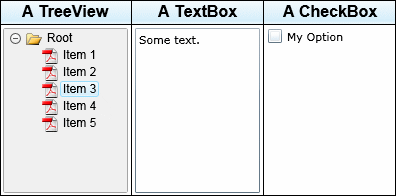
Silverlight Table Control

Latest Forum Posts

Here are latest posts from around the forums, if you have a question about any of the Liquid controls you can get your answers in the Forum.

Hi guys,


Greate control you have guys. Well done. I have some questions though :


1- Is there the ability to insert chunks of UIElement programatically when the RichtextEditor loads or at any given event ?

     for instance : I want to add : "<b>" as a TextBlockPlus and and the text : "some text" as normal TextBlock. I just want to   highlight html tags. I have tried using richTextBox.Children.Add() method but it is giving errors.


2-  Ability for the control to dynamically adapt its width inside a grid Row by giving it a min-width ?


3- Is there an easy way to replace specific text programatically.


Thanks

Thank you for your reply!


here's the xml that got saved into the database:


<LiquidRichText xmlns:liquid="clr-namespace:Liquid;assembly=Liquid.RichText">

 <Style ID="Normal" FontFamily="Portable User Interface" FontSize="11" Foreground="#FF000000" Alignment="Left" VerticalAlignment="Center" />

<Style ID="Custom6" FontFamily="Times New Roman" FontSize="36" FontWeight="Bold" Foreground="#FF339966" Alignment="Center" VerticalAlignment="Center" />

<Style ID="Custom13" FontFamily="Times New Roman" FontSize="72" FontStyle="Italic" FontWeight="Bold" Decoration="Underline" Foreground="#FFFF6600" Alignment="Center" VerticalAlignment="Center" />

<Style ID="Custom14" FontFamily="Times New Roman" FontSize="72" FontStyle="Italic" FontWeight="Bold" Decoration="Underline" Foreground="#FFFF6600" Alignment="Left" VerticalAlignment="Center" />

<TableStyle ID="TableDefault" BorderBrush="#FF000000" BorderThickness="1,1,1,1" CellBorderBrush="#FF000000" CellBorderThickness="1,1,1,1" CellPadding="2">

</TableStyle>

<Text Style="Custom6">

<![CDATA[1ère année enseignement fondamentale]]>

</Text>

<Newline />

<Text Style="Custom13">

<![CDATA[Arabe]]>

</Text>

<Newline />

<Xaml>

<liquid:Bullet Type="Number" Number="1" />

</Xaml>

<Text Style="Custom14">

<![CDATA[A]]>

</Text>

<Newline />

<Xaml>

<liquid:Bullet Type="Number" Number="2" />

</Xaml>

<Text Style="Custom14">

<![CDATA[B]]>

</Text>

<Newline />

<Xaml>

<liquid:Bullet Type="Number" Number="3" />

</Xaml>

<Text Style="Custom14">

<![CDATA[C]]>

</Text>

</LiquidRichText>


At the beginning, the developpement was being done on version 3 of silverlight, that's why I had to use version 5.2.7. but after encountring yet another limitation, my boss decided that it should be okay for my project to be ported to version 4, which was quite easy and straight forward.

The limitation we had is that version 5.2.7 of your RichTextBox didn't support writing Arabic (the letters appeared but weren't connected to each other as it should be in arabic), your new version of the control 5.3.2, supported writing arabic, but what I noticed is that selecting and formatting arabic text wasn't working well, when I select the first letter of a word and apply bold to it, the last letter becomes bold instead and exchange places with the first! In addition to that, there's the fact that selection wasn't following letters quite well.

We could have used the new richtextarea included with silverlight 4 which appears to have solved these problems but I couldn't export to HTML, so my final choice was to use your HtmlRichTextArea. I noticed that this control is based on the native one, adding to it loading and exporting HTML.

Actually, I liked your RichtextBox better because it's much more flexible and easy when it comes to formatting. The HtmlRichTextArea was very limited in its formatting capabilities, and I'm even having problems with text alignement right now (If I change the alignement of some text, when I go to the next line with a return, the alignement of the new line doesn't persist and it turns back to left aligned).


I hope I wasn't very exhausting, but I think my feedback will keep you more informed, so that your controls will become even more useful to everyone.


Thank you for your help!! ^^

Is there a way to store the new words in the cookies or something?  I implemented the spell checker for the rich text box, but it can't remember my words.  I can't really write it to the .xap file.  I would guess a cookie, or isolated storage?  So when you add a new word, I should probably add code to write to that location.  Then when the list is called up, it reads from the isolated storage and the dictionary file?  Is this a good way to do it?


I want each user to have their own additional words on their computer.

Hi Bryan,


In the current version no.  The RichTextBox uses an XML reader to process the HTML so your HTML must be XHTML formatted.  If a tag is encountered that is not supported the RichTextBox should ignore it by default.


Thanks!

Hi romwilli,


I have tested your sample HTML and after reloading it I get the following:


<p style="margin:0px;"><span style="font-family:Verdana;font-size:36px;">Hallo</span></p>


This obviously contains the correct font size, could you tell me how you are reloading it back in?


Thanks!

Rate this page: 

1 Star 2 Star 3 Star 4 Star 5 Star
12 Ratings / 2.5 Average

Ultimate Gamers

  • 1 stig
  • 2 Gh0sT
  • 3 dhoz
  • 4 janso
  • 5 gaaslin
  • 6 RadiateLogic
  • 7 dan
  • 8 Haroldo
  • 9 bigblue531
  • 10 oussama

  • See the full chart here!

Silverlight Controls

  • Rich TextBox

    Create and edit rich content with this slick and expandable Rich TextBox...

  • TreeView

    This easy to use TreeView comes with drag and drop, sorting, searching and much more...

  • Context Menu

    You too can have cool popup context menus in your Silverlight applications...

  • Resizable Dialog

    Draggable and resizable popup dialogs are what serious Silverlight developers need...

  • Spell Checker

    Real-time spell checking in Silverlight? We did it first here...