Latest News

  • Silverlight Online Chat
    Jul 24, 2010

    Today we launch the new Silverlight Live Chat application demonstrating the Liquid RichTextBox and Emoticon replacements.

  • New Super Shoot Em Up 2 Game
    Jun 29, 2010

    Added to the Games section is the new Super Shoot 'Em Up 2 game. Take control of your tank with the aim to defeat the computer controlled opponents. Features all new weapons, levels and Battle Mode!

  • Silverlight 4 Controls V5.3.2 Released
    Jun 28, 2010

    This release contains several fixes raised in the forums.

  • New Sandmania Puzzle Game
    Jun 18, 2010

    Sandmania is the latest game from vectorlight, the aim of this game is to guide sand from the top of the screen to the various colored containers below.

  • New Moon Tower Defense Game
    May 29, 2010

    Added to the Games section is the new Moon Tower Defense game. Defend the Moon from the circling Aliens and Humans.

Silverlight Spell Checker Component

This free Silverlight Spell Checker component allows you to apply real-time spell checking functionality to your Silverlight applications with the minimum of code.  Dictionaries are not supplied, however they can be freely downloaded and used with this component.

To use the Spell Checker you will need to add a reference to Liquid.Components.dll in your project.


How to Use the Spell Checker Component

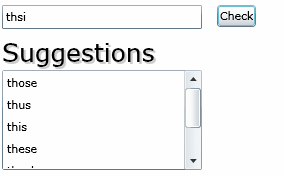
To demonstrate the Spell Checker component we have a single TextBox and a Button.  The Button Click event handler takes the textbox text and runs it through the spell checker and populates a ListBox with spelling suggestions if the input word was not found in the dictionary.  In your Silverlight XAML:

<UserControl x:Class="SpellChecker.Page"
    xmlns="http://schemas.microsoft.com/winfx/2006/xaml/presentation"
    xmlns:x="http://schemas.microsoft.com/winfx/2006/xaml"
    Width="400" Height="300">
    <Canvas>
        <TextBox x:Name="word" Canvas.Left="5" Canvas.Top="10" Width="200" />
        <Button Content="Check" Canvas.Left="220" Canvas.Top="10" Click="Button_Click" />
        <TextBlock Canvas.Left="5" Canvas.Top="40" Text="Suggestions" FontSize="25" />
        <ListBox x:Name="suggestions" Canvas.Left="5" Canvas.Top="75" Width="200" Height="100" />
    </Canvas>
</UserControl>


In your C# code behind file we handle the button click event and make the call to CheckWord() which returns true to indicate a correct word.  If the word is incorrect we call GetSuggestions() which returns a List<string> collection of spelling suggestions which we use to simply populate our ListBox.

using System;
using System.Collections.Generic;
using System.Linq;
using System.Net;
using System.Windows;
using System.Windows.Controls;
using System.Windows.Documents;
using System.Windows.Input;
using System.Windows.Media;
using System.Windows.Media.Animation;
using System.Windows.Shapes;

namespace SpellChecker
{
    public partial class Page : UserControl
    {
        private Liquid.Components.SpellChecker _spellChecker;

        public Page()
        {
            InitializeComponent();

            _spellChecker = new Liquid.Components.SpellChecker((this.GetType().Assembly.GetManifestResourceStream("SpellChecker.dictionary.en-US.dic")));
        }

        private void Button_Click(object sender, RoutedEventArgs e)
        {
            bool success = _spellChecker.CheckWord(word.Text);
            List<string> suggest;

            if (!success)
            {
                suggest = _spellChecker.GetSuggestions(word.Text);
                suggestions.Items.Clear();

                foreach (string s in suggest)
                {
                    suggestions.Items.Add(new ListBoxItem() { Content = s });
                }
            }
        }
    }
}


Example Silverlight Spell Checker:

Silverlight Spell Checker

Latest Forum Posts

Here are latest posts from around the forums, if you have a question about any of the Liquid controls you can get your answers in the Forum.

Hi,


We have tracked this problem down and will implement a fix to the uploader component in the next version to fix this.


Thanks!

dan posted on RollerBind Effect

Hi Len,


Yes, its a variant of the Text Roller Blind and is named the Text Rotator Blind and uses the 3D rotation capability present in SL3 to produce this effect.  It is included in Liquid.dll and details of its use can be found here:


http://www.vectorlight.net/controls/text_rotator_blind.aspx


Thanks!

Hi Craig,


For dictionaries you can find compatible ones which includes a British one with the Net Spell download:


http://sourceforge.net/projects/netspell/files/


Thanks!

Hi,


If I understand you correctly you want to add a Tool-tip to an ItemViewerItem object?


ToolTipService.SetToolTip(myItemViewerItem, "Some tool-tip");


Thanks!

Hi Brian,


Not at this time, however I have added this as a feature request and it will be implemented in the next version.


Thanks!

Hi,


Again, please check your web.config for the lines mentioned above.  An exception is thrown when the client cannot communicate with the server.


Thanks!

Rate this page: 

1 Star 2 Star 3 Star 4 Star 5 Star
10 Ratings / 2.6 Average

Ultimate Gamers

  • 1 stig
  • 2 Gh0sT
  • 3 dhoz
  • 4 janso
  • 5 gaaslin
  • 6 RadiateLogic
  • 7 dan
  • 8 Haroldo
  • 9 bigblue531
  • 10 oussama

  • See the full chart here!

Silverlight Controls

  • Rich TextBox

    Create and edit rich content with this slick and expandable Rich TextBox...

  • TreeView

    This easy to use TreeView comes with drag and drop, sorting, searching and much more...

  • Context Menu

    You too can have cool popup context menus in your Silverlight applications...

  • Resizable Dialog

    Draggable and resizable popup dialogs are what serious Silverlight developers need...

  • Spell Checker

    Real-time spell checking in Silverlight? We did it first here...