
Rich Text Editor
This free Rich Text Editor control takes the standard Liquid RichTextBox and wraps it up with some standard formatting functionality. This convenient User Control allows you to customize what formatting controls you want to be usable.
 You need to login to Download the Rich Text Editor, If you do not have a login you can register for free!
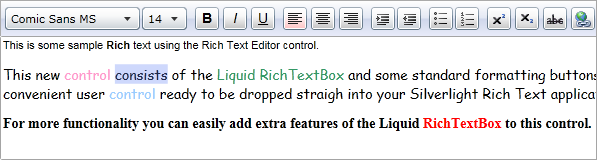
The Rich Text Editor is a User Control that resides in the Liquid namespace. To use it in your own project you need to copy the RichTextEditor files to your Silverlight project.
Here we create an instance of the Rich Text Editor user control and set its initial Html content. After that the content can be formatted by the user and the resulting Html retrieved from the same property.
Because the Rich Text Editor is supplied as a User Control you are free to modify what formatting options are available to the user.
Guide the car to its parking space in this fun Car Parking game.

Aim for the Trash Can and get the various items of Trash in the bin.
Fly your plane in this colorful vertical scrolling shoot-em-up. Blast the bad guys and collect any bonus's they leave behind.
Pop as many bubbles as possible in this fun and colorful bubble popping game. The levels start off easy enough but gradually get harder!
Here we have a bunch of monsters that need to be matched up. Look out for the bomb and spinning monsters that will cause special damage!

Guide your friendly Bird through the maze of pipes and other obstacles collecting the Stars in this cool arcade game inspired by the legendary Flappy Bird.
You are stranded on an Alien planet. Your goal is to build a space rocket and escape. Start by building units to create power and mine the metal patches. Build defenses to defend your base from the advancing Aliens and Zombies!

Play Pool against the computer or battle against your friends in the online mode!
Slice the fruit that is thrown up onto the screen. Slice the fruit into multiple pieces for maximum points!