
Silverlight Popup Dialog

This free Silverlight Popup Dialog is easy to implement on your Silverlight driven website and is also customizable to provide a visual feel suitable for any site design.


To view the full Popup Dialog demo please see the main Silverlight controls demo.  To use the Popup Dialog control you will need to add a reference to Liquid.Popup.dll in your project.


How to Use the Popup Dialog Control

To use the Popup Dialog on your Silverlight page:

<UserControl x:Class="PopupDialog.Page"
    xmlns="http://schemas.microsoft.com/client/2007"
    xmlns:x="http://schemas.microsoft.com/winfx/2006/xaml"
    xmlns:liquidPopup="clr-namespace:Liquid;assembly=Liquid.Popup"
    Width="600" Height="300">
    <Grid>
        <Button x:Name="showDialog" Canvas.Left="20" Canvas.Top="20" Content="Show Dialog" Width="100" Height="20" Click="ShowDialog_Clicked" />
        <liquidPopup:Dialog x:Name="areYouSure" Width="200" Height="180" Title="Are you sure?" Closed="AreYouSure_Closed">
            <TextBlock x:Name="messageText" TextWrapping="Wrap" Text="Your form will now be submitted, due to the high levels of interest in this position please allow Two weeks to process." />
        </liquidPopup:Dialog>
    </Grid>
</UserControl>


In your C# code behind file you can refer to the Dialog using areYouSure.  In this example we create a simple popup dialog containing OK and Cancel buttons with some text, to show the dialog click the 'Show Dialog' button.

using System;
using System.Collections.Generic;
using System.Linq;
using System.Windows;
using System.Windows.Controls;
using System.Windows.Documents;
using System.Windows.Input;
using System.Windows.Media;
using System.Windows.Media.Animation;
using System.Windows.Shapes;

using Liquid;

namespace PopupDialog
{
    public partial class Page : UserControl
    {
        public Page()
        {
            InitializeComponent();
        }

        private void ShowDialog_Clicked(object sender, RoutedEventArgs e)
        {
            areYouSure.Show();

            messageText.Text = "New message";
        }

        private void AreYouSure_Closed(object sender, EventArgs e)
        {
            if (areYouSure.Result == DialogButtons.OK)
            {
                // Do some code here for the okay button
            }
        }
    }
}


Like the .NET modal dialogs, we make a call to the Show() method or the ShowAsModal() method when we want to display the dialog.  Notice how the other controls on the parent Canvas become disabled when the dialog is displayed, this ensures the user closes the dialog before they can continue with your Silverlight application.

Example Silverlight Popup Dialog Control:
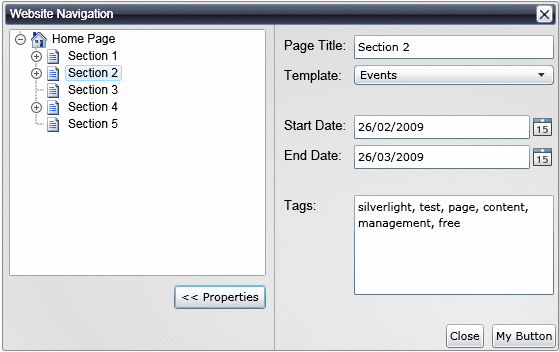
Silverlight Popup Dialog Control

Latest Forum Posts

Here are latest posts from around the forums, if you have a question about any of the Liquid controls you can get your answers in the Forum.

Hi,


You can achive this by using a custom style.  The default style for the Dialogs from:


http://www.vectorlight.net/controls/popup_dialog/visual_customizations.aspx


There is a StackPanel named ElementTopButtons, simply set this to Visibility = Visibility.Collapsed


Thanks!

How to implemente a still for return value in Dialog?


Is using Canvas.Childs.Add() method?

then, can not move the child dialog out of canvas..


Sorry for my bad english..

harrisonw posted on More Custom Button Questions

Hey Dan,

Yes I was incluing the "using Liquid;" line of code. I did find a way around it though, so no worries.

I have a messagebox defined like this (no height and width specified):

<liquidPopup:MessageBox x:Name="messageBoxDialog" />


What if my text is larger than the messagebox; is there a way to let it autosize on its content ? Or does it have some scroll or resize properties ?

JumbocactuarX27 posted on Resizing From Corners

Thank you for considering this.


Also, thank you again for the great set of tools.

am unable to view liquid controls in my tool box. how to view them in the tool box?

Silverlight Controls

  • Rich TextBox

    Create and edit rich content with this slick and expandable Rich TextBox...

  • TreeView

    This easy to use TreeView comes with drag and drop, sorting, searching and much more...

  • Context Menu

    You too can have cool popup context menus in your Silverlight applications...

  • Resizable Dialog

    Draggable and resizable popup dialogs are what serious Silverlight developers need...

  • Spell Checker

    Real-time spell checking in Silverlight? We did it first here...

Latest News

  • Super Shoot Em Up Game
    Feb 04, 2010

    Added to the games section is the new Super Shoot 'Em Up game. Take control of a tank with your aim being to blow up your opposing tanks and collect all the powerups.

  • Silverlight 3 Controls V5.2.6 Released
    Feb 04, 2010

    This release includes some minor fixes for several forum posts. Please see the notes on the download page for full details on what has changed.

  • Chaos Tournament Game
    Jan 24, 2010

    Launched today is the new Games section which contains the new Silverlight only Chaos Tournament game. This game is a remake of a classic 1985 ZX Spectrum game Chaos.

  • Silverlight 4 Local File Browser Demo
    Nov 25, 2009

    Just added today to the Demos page is the new Silverlight 4 Local File Browser Demo which, as its name suggests provides a visual way to navigate the local file system.

  • New Silverlight 4 Html RichTextArea Control
    Nov 24, 2009

    To help Silverlight 4 developers getting to grips with the RichTextArea control we have created an enhanced version that allows basic HTML to be loaded and saved.