
Latest News

  • Super Tower Defense 2 Game
    Sep 03, 2010

    New to the games section is Super Tower Defense 2. Featuring more maps, new units and bigger explosions.

  • Super Cards Online Multiplayer Game
    Aug 13, 2010

    Released today in the games section is the new Super Cards multiplayer card game. The aim of the game is to get rid of all your playing cards before your opposition.

  • Silverlight Online Chat
    Jul 24, 2010

    Today we launch the new Silverlight Live Chat application demonstrating the Liquid RichTextBox and Emoticon replacements.

  • New Super Shoot Em Up 2 Game
    Jun 29, 2010

    Added to the Games section is the new Super Shoot 'Em Up 2 game. Take control of your tank with the aim to defeat the computer controlled opponents. Features all new weapons, levels and Battle Mode!

  • Silverlight 4 Controls V5.3.2 Released
    Jun 28, 2010

    This release contains several fixes raised in the forums.

Silverlight Popup Bubble

This free Silverlight Popup Bubble is easy to implement on your Silverlight driven website and is also customizable to provide a visual feel suitable for any site design.

To use the Popup Bubble control you will need to add a reference to Liquid.Popup.dll in your project.


How to Use the Popup Bubble Control

To use the Popup Bubble on your Silverlight page:

<UserControl x:Class="Bubble.Page"
    xmlns="http://schemas.microsoft.com/winfx/2006/xaml/presentation"
    xmlns:x="http://schemas.microsoft.com/winfx/2006/xaml"
    xmlns:liquidPopup="clr-namespace:Liquid;assembly=Liquid.Popup"
    Width="400" Height="300">
    <Canvas x:Name="LayoutRoot" Background="White">
        <Button x:Name="showDialog" Canvas.Left="20" Canvas.Top="20" Content="Show Dialog" Width="100" Height="20" Click="Bubble_ButtonClick" />
        <liquidPopup:Bubble x:Name="bubblePopup" Canvas.Left="50" Canvas.Top="50" Width="300" Height="120" Lip="BottomLeft">
            <StackPanel>
                <TextBlock Width="300" TextWrapping="Wrap" Padding="10" Text="This is a Liquid bubble popup! It will close in 15 seconds or when you click the Close button!" />
                <Button Content="Close" Click="BubbleClose_Click" HorizontalAlignment="Right" Margin="10" />
            </StackPanel>
        </liquidPopup:Bubble>
    </Canvas>
</UserControl>


In your C# code behind file you can refer to the Bubble using bubblePopup.  In this example we create a simple popup bubble containing a Close button with some text, to show the dialog click the 'Show Bubble' button.

using System;
using System.Collections.Generic;
using System.Linq;
using System.Net;
using System.Windows;
using System.Windows.Controls;
using System.Windows.Documents;
using System.Windows.Input;
using System.Windows.Media;
using System.Windows.Media.Animation;
using System.Windows.Shapes;

namespace Bubble
{
    public partial class Page : UserControl
    {
        public Page()
        {
            InitializeComponent();

            bubblePopup.IsTimerEnabled = true;
            bubblePopup.TimeUntilClose = new TimeSpan(0, 0, 15);
        }

        private void Bubble_ButtonClick(object sender, RoutedEventArgs e)
        {
            bubblePopup.Show();
        }

        private void BubbleClose_Click(object sender, RoutedEventArgs e)
        {
            bubblePopup.Close();
        }
    }
}


If you display the bubble without clicking the Close button, the bubble will close automatically after 15 seconds.  This timeout and close feature is present on all the Liquid Popup dialogs.

Example Silverlight Popup Bubble Control:
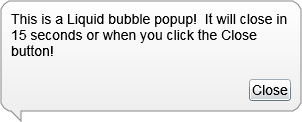
Silverlight Popup Bubble Control

Latest Forum Posts

Here are latest posts from around the forums, if you have a question about any of the Liquid controls you can get your answers in the Forum.

First of all, i wannt thank these controls and this site.

your works is wonderful and they are so helpful to me.


i am using Liquid.Popup dialog.

but i can't move this popup control to outside of browser at all.


for example, in Windows, All windows can moved to outside of desktop.

because part of title bar is still remained at screen. so we can move again it to anywhere.


but Liquid.Popup dialog is diffrent.

it is just stuck at edge of Browser, can't moved at all.

furthermore, if i drag mouse to outside of brower, i lose my mouse handling, so have to click again title bar of dialog.


Can somebody help me?

scottf posted on XmlParseException

Hey Dan,


First off thanks for the awesome controls they a gorgeous piece of work.


I am sure this is a simple question, but I downloaded the newest DLLs on your site, and I was wanting to style the Dialog control, and so I copied and pasted the code you have on the site here. When I fire it up in Blend 4 it gives me the following error when I try to view the Dialog style:


An Exception was thrown.


XmlParseException: [Line: 0 Position: 0]

StackTrace

InnerException: Value does not fall within the expected range.


I tried to copy and paste from the source code as well you offer on here but no go.


Any idea whats causing this?


Thanks!

dan posted on MessageBox Popup errors

Hi,


Unfortunately as you have seen there is a clash between the Liquid.MessageBox and the new standard MessageBox.  The solution will be to rename the Liquid.MessageBox class to something else.  This is something we will do in the next version.


Thanks!

Hi,


In short no, well not without it looking messy.  You can overlay HTML onto Silverlight content but I suspect you would run into trouble if the dialog was dragged by the user.  In SL4 and out of browser mode there is the WebBrowser control that can render HTML in Silverlight.  This too has issues particulally rendering order i.e the WebBrowser control always gets rendered on top of anything.


Thanks!

Hi,


In DialogBase create yor own event for your custom button click and simply raise it when clicked.


public event DialogEventHandler MyButtonClickEvent;


if (MyButtonClickEvent != null)

{

    MyButtonClickEvent(sender, args);

}


You then attach to this event from your main program.  There are plenty of articles out there explaining how to setup custom events that you may want to refer to.


Thanks!

gcoleman0828 posted on Resizing issues when using a Grid

When using a Datagrid as Content inside the Dialog control, I can get it it to resize using the SizeChanged attribute, but it is always quite off. I have to static a -40 to make it sit within the size of the Dialog. Obviously, this breaks as soon as you try to minimize as it becomes a negative value. Please help. I am obviously missing something vital. It's not that complicated and I'm almost there...


Here is my Code


MainPage.xaml


<my:Dialog x:Name="EmployeeDirectoryDialog" ButtonsVisibility="Collapsed" IsResizable="True" IsMinimizeEnabled="True" Canvas.Left="6" Canvas.Top="-43" Height="420" Width="785" Minimizing="Dialog_Minimizing" Minimized="Dialog_Minimized" Restoring="Dialog_Restoring" SizeChanged="EmployeeDirectoryDialog_SizeChanged">

                <Canvas x:Name="EmployeeDirectoryCanvas" >


                    <sdk:DataGrid ScrollViewer.VerticalScrollBarVisibility="Visible" ScrollViewer.HorizontalScrollBarVisibility="Visible" AutoGenerateColumns="True" Canvas.Left="6" Canvas.Top="6" Height="380" Width="760" x:Name="EmployeeDirectoryGrid"  AutoGeneratingColumn="EmployeeGrid_AutoGeneratingColumn" />

                        <my1:BusyIndicator x:Name="Employeebusyindicator" HorizontalAlignment="Center" VerticalAlignment="Center"  IsBusy="False" Height="21" Width="154" Canvas.Left="336" Canvas.Top="212" />


                </Canvas>

            </my:Dialog>


MainPage.xaml.cs


 private void EmployeeDirectoryDialog_SizeChanged(object sender, SizeChangedEventArgs e)

        {

            //EmployeeDirectoryDialog.Content = "H = " + e.NewSize.Height.ToString() + "W = " + e.NewSize.Width.ToString();


            double EmployeeDirectoryGridHeight = e.NewSize.Height - 40;

            double EmployeeDirectoryGridWidth = e.NewSize.Width - 40;

          EmployeeDirectoryGrid.Height = EmployeeDirectoryGridHeight;

          EmployeeDirectoryGrid.Width = EmployeeDirectoryGridWidth;


        }

Rate this page: 

1 Star 2 Star 3 Star 4 Star 5 Star
23 Ratings / 3.3 Average

Ultimate Gamers

  • 1 Gh0sT
  • 2 stig
  • 3 dhoz
  • 4 seyhmusss
  • 5 RadiateLogic
  • 6 bigblue531
  • 7 janso
  • 8 DutchRemco
  • 9 Gendibal
  • 10 dan

  • See the full chart here!

Silverlight Controls

  • Rich TextBox

    Create and edit rich content with this slick and expandable Rich TextBox...

  • TreeView

    This easy to use TreeView comes with drag and drop, sorting, searching and much more...

  • Context Menu

    You too can have cool popup context menus in your Silverlight applications...

  • Resizable Dialog

    Draggable and resizable popup dialogs are what serious Silverlight developers need...

  • Spell Checker

    Real-time spell checking in Silverlight? We did it first here...