
Latest News

  • Super Tower Defense Game
    Mar 10, 2010

    New to the games section is the new Super Tower Defense game. Defend your base from the ever advancing army of tanks, buggies...

  • New Rich Text Editor User Control
    Feb 19, 2010

    By popular request, here we present a re-usable User Control containing the Liquid RichTextBox along with the most common formatting functions included.

  • Silverlight 3 Controls V5.2.7 Released
    Feb 19, 2010

    This release includes several fixes for issues raised in the forum. The main improvement is to the RichTextBox which now provides access and methods to the document elements allowing...

  • Super Shoot Em Up Game
    Feb 04, 2010

    Added to the games section is the new Super Shoot 'Em Up game. Take control of a tank with your aim being to blow up your opposing tanks and collect all the powerups.

  • Silverlight 3 Controls V5.2.6 Released
    Feb 04, 2010

    This release includes some minor fixes for several forum posts. Please see the notes on the download page for full details on what has changed.

Silverlight DropDown Control

This free DropDown control is, as its name suggests a generic control for allowing any content to be presented in a manner similar to the ComboBox.

This Silverlight only DropDown Control is easy to implement on your Silverlight driven website and is also customizable to provide a visual feel suitable for any site design.

To use the DropDown control you will need to add a reference to Liquid.dll in your project.


How to Use the DropDown Control

To use the DropDown on your Silverlight page:

<UserControl x:Class="DropDown.Page"
    xmlns="http://schemas.microsoft.com/winfx/2006/xaml/presentation"
    xmlns:x="http://schemas.microsoft.com/winfx/2006/xaml"
    xmlns:liquid="clr-namespace:Liquid;assembly=Liquid"
    xmlns:liquidTreeView="clr-namespace:Liquid;assembly=Liquid.TreeView"
    Width="400" Height="300">
    <Grid x:Name="LayoutRoot" Background="White">
        <liquid:DropDown x:Name="dropDown" Width="100" Height="23" SelectedItemContent="Pick...">
            <liquidTreeView:Tree x:Name="treeView" Width="150" Height="150" EnableLines="True" SelectionChanged="Tree_SelectionChanged">
                <liquidTreeView:Node Title="Root Node">
                    <liquidTreeView:Node Title="Item 1" />
                    <liquidTreeView:Node Title="Item 2" />
                    <liquidTreeView:Node Title="Item 3" />
                    <liquidTreeView:Node Title="Item 4" />
                    <liquidTreeView:Node Title="Item 5" />
                </liquidTreeView:Node>
            </liquidTreeView:Tree>
        </liquid:DropDown>
    </Grid>
</UserControl>


With this DropDown control example we embed a TreeView control, this is the content that will "drop down" or "popup" when the button it clicked.

We have a single DropDown control named dropDown, this when clicked will display the TreeView and allow you to expand and select a single node from the tree.  When you have selected a node the TreeView will close, this is handled in a few lines of C# below.

using System;
using System.Collections.Generic;
using System.Linq;
using System.Net;
using System.Windows;
using System.Windows.Controls;
using System.Windows.Documents;
using System.Windows.Input;
using System.Windows.Media;
using System.Windows.Media.Animation;
using System.Windows.Shapes;

using Liquid;

namespace DropDown
{
    public partial class Page : UserControl
    {
        public Page()
        {
            InitializeComponent();
        }

        private void Tree_SelectionChanged(object sender, TreeEventArgs e)
        {
            dropDown.SelectedItemContent = e.Target.Title;
            dropDown.IsOpen = false;
        }
    }
}


As you can see in the C# we attach an event handler to theSelectionChanged event which occurs when a node is selected.  In this event we change the SelectedItemContent property of our dropdown to relect the changes made and then close the dropdown with DropDown.IsOpen = false.

Example Silverlight DropDown Control:
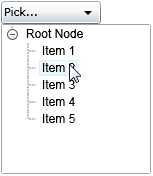
The DropDown Control

Latest Forum Posts

Here are latest posts from around the forums, if you have a question about any of the Liquid controls you can get your answers in the Forum.

dan posted on Color selector bugs?

Hi Ron,


Unfortunately not in the current version, Transparent will render as White.  I'll see if we can make the colour visual configurable for individual color cells in the next version.


Thanks!

Hi I have an enhancement to suggest to the color selector.


My application actually uses 3 color selectors all with custom colors enabled and what I've found is that all 3 of these use the same custom color palette object (ColorSelector.Custom). Is it possible to make it so that these all use a different custom color palette ie they have their own member Custom list variables instead of a static one for the entire ColorSelector class?


I've tried to define my own List of uints for each of the color selectors but the currently selected color doesn't update properly so I assume there is something else going on underneath that I don't have access to.


Thanks again!


Luan

Dose Liquid support Silverlight 4.0 beta?

Dan,

I am working with your Color Selector control and Custom Colors which is a very nice implementation!


However, I have a challenge which I am unsure how to handle:


How do I detect whether a particular color already exists in the Pallette?  For instance: #FF5E60B8 which was selected from the CustomColors functionality...  I don't want to add the color to the CustomColors if it already exists in the standard pallette...  I want to just select that color using the "SELECTED" property...


Thanks in advance!

Ron


Hi,


I have updated the demo as the current one was built against an older version of Visual Studio.  You can download the updated demo from the same link as before.


http://www.vectorlight.net/controls/itemviewer.aspx


Thanks!

Hi,


This I did see occur once and having looked at the code have made a slight change to the closed event handler that hopefully fixes this.  This fix will be available in the next version of the controls library.


Thanks!

Silverlight Controls

  • Rich TextBox

    Create and edit rich content with this slick and expandable Rich TextBox...

  • TreeView

    This easy to use TreeView comes with drag and drop, sorting, searching and much more...

  • Context Menu

    You too can have cool popup context menus in your Silverlight applications...

  • Resizable Dialog

    Draggable and resizable popup dialogs are what serious Silverlight developers need...

  • Spell Checker

    Real-time spell checking in Silverlight? We did it first here...